Purchase & receive
Work with your vendors, create purchase orders, receive items into stock and resolve items that need a catalogue match.
The MogDock toolkit
Inventory, manufacturing, stockroom, sales and finances. Trade show leads, service payouts and employee bonuses, too. Explore the tools that bring your small business together.
All featuresFree trialNo credit card required
Features at a glance
Keep the things you sell and the parts you use in one connected catalog.
| Feature | What you can do |
|---|---|
| Product catalog | Keep product codes (SKUs), descriptions, photos, prices and costs together. Duplicate an existing product to start a similar one. |
| Channel selling prices | Record a product’s selling price for each sales channel and compare amounts after configured channel fees. |
| Parts catalog | Track component records separately from finished products, with their own quantities, costs and supplier details. |
| Categories & subcategories | Organize your catalog into categories and subcategories, and set their display order. |
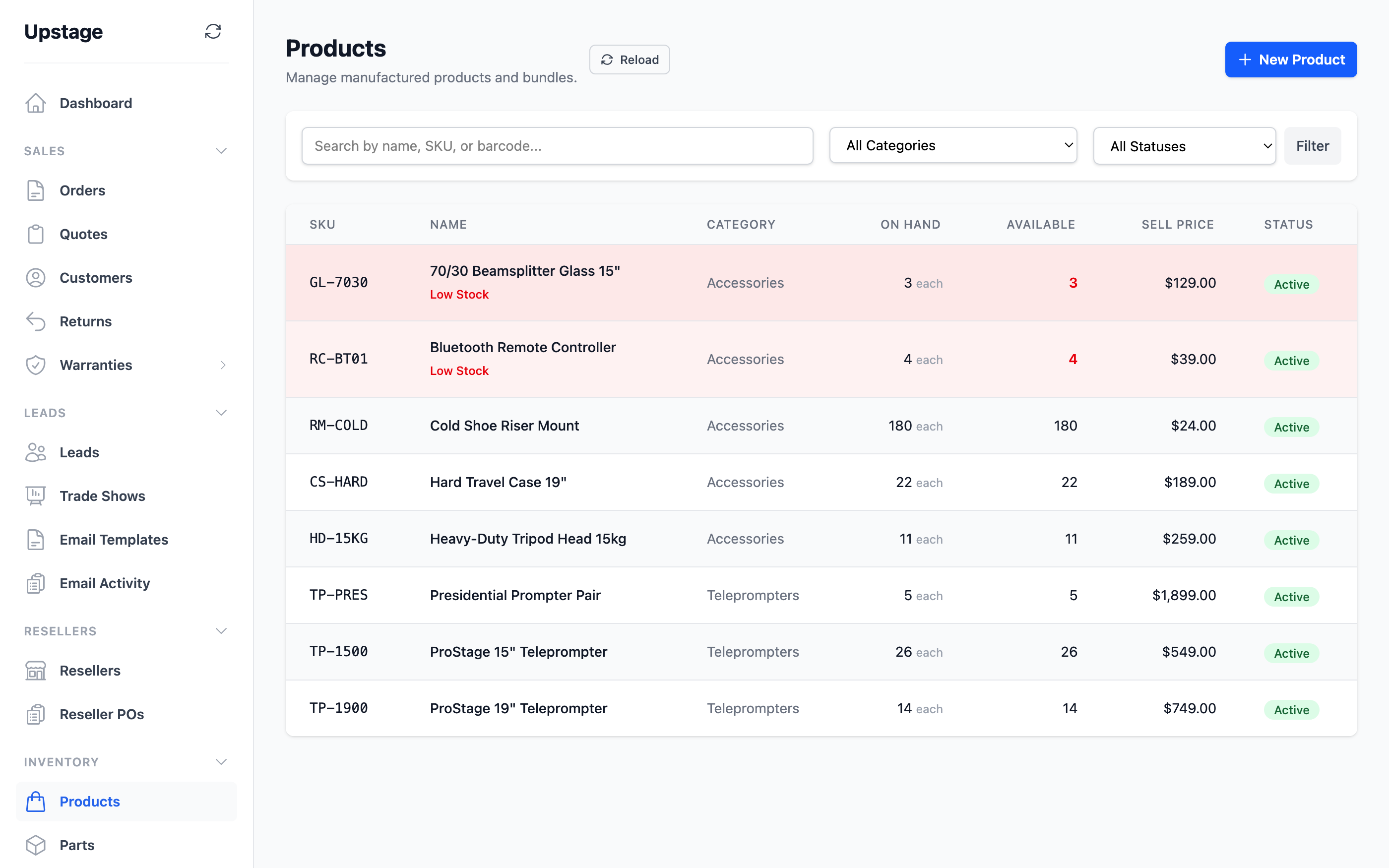
| On-hand, reserved & available stock | See what is physically on the shelf, what is reserved and what remains available. |
| Low-stock indicators | Set item thresholds and spot products or parts that need replenishing in your inventory views. |
| Inventory adjustments & history | Record quantity changes with a reason and notes, and keep a history of stock movements. |
| Units & purchase conversions | Set the unit you track and the unit you buy, with a conversion factor between them. |
| Barcodes & manufacturer references | Store barcodes and manufacturer part numbers alongside your own SKUs. |
| Product lifecycle | Mark products active, inactive or discontinued while retaining their business records. |
| Bulk inventory grid | Review and update multiple part records and stock quantities from a grid. |
Define what goes into each product, from its component list to the materials needed to pack it.
| Feature | What you can do |
|---|---|
| Bills of materials (BOMs) | List the parts that make up a product and set the quantity of each part used per unit. |
| Component editing | Add, change or remove components on the product record as its design changes. |
| Material cost rollup | See the cost of each component and the combined material cost for the product. |
| Build-to-order products | Identify products manufactured in house as build-to-order items in your catalog. |
| Product bundles | Define a product that groups other products together, with component quantities. |
| Packaging requirements | Specify the boxes and other shipping supplies needed for each product. Carry those requirements into order packaging. |
Work through the shelf one part at a time, with the next scan ready when you finish.
| Feature | What you can do |
|---|---|
| Part labels & QR codes | Give each part a dedicated inventory label and QR code that opens its stock workflow. |
| Scan to a part | Enter a label code or scan its QR URL to open the matching part using a USB or Bluetooth scanner. |
| Cycle counts | Set the exact on-hand quantity after a count, then save and move straight to the next scan. |
| Quick stock adjustments | Add or subtract a quantity with a reason, such as damage or a receiving correction. |
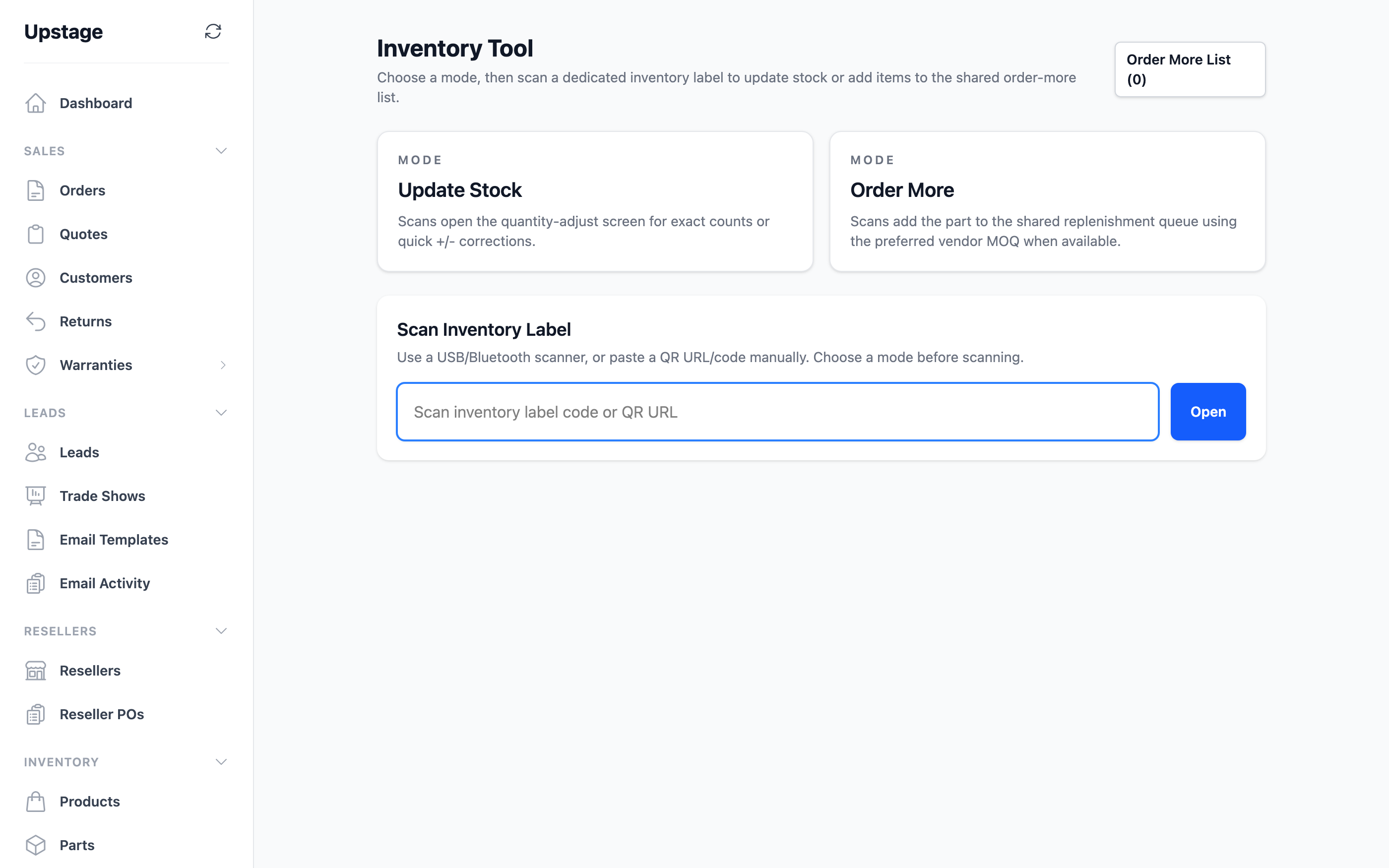
| Update & reorder modes | Choose whether scanning opens the stock update screen or adds the part to the reorder queue. |
| Reorder queue | Collect parts that need replenishing, review quantities and vendors, and clear items as needed. |
| Reorder to purchase order | Turn queued parts into vendor purchase orders, using supplier minimum quantities where configured. |
| Label printing & exports | Print or reprint individual labels and export labels in bulk, with PDF, Zebra and DYMO options. |
| Label settings | Configure inventory label output for your stockroom’s printing setup. |
Connect what you need to buy with who supplies it and what arrives.
| Feature | What you can do |
|---|---|
| Vendor directory | Keep supplier contact information and notes with the items and purchase orders they supply. |
| Supplier item references | Link catalog items to their suppliers, including vendor item codes and purchasing details. |
| Preferred vendors & minimum orders | Set supplier preferences and minimum order quantities to guide replenishment. |
| Purchase orders | Prepare purchase orders with line items, quantities and costs. Duplicate an existing order for repeat purchases. |
| Purchase order PDFs | Generate a purchase order PDF to share with your supplier. |
| Stock receiving | Receive items against a purchase order and connect the receipt to inventory. |
| Unmatched purchase items | Review purchase lines without a catalog match and link them to the correct item. |
| Create parts from purchases | Create missing part records from purchase order items without re-entering the whole purchase. |
Follow the sale from the first quote through the order, shipment and customer history.
| Feature | What you can do |
|---|---|
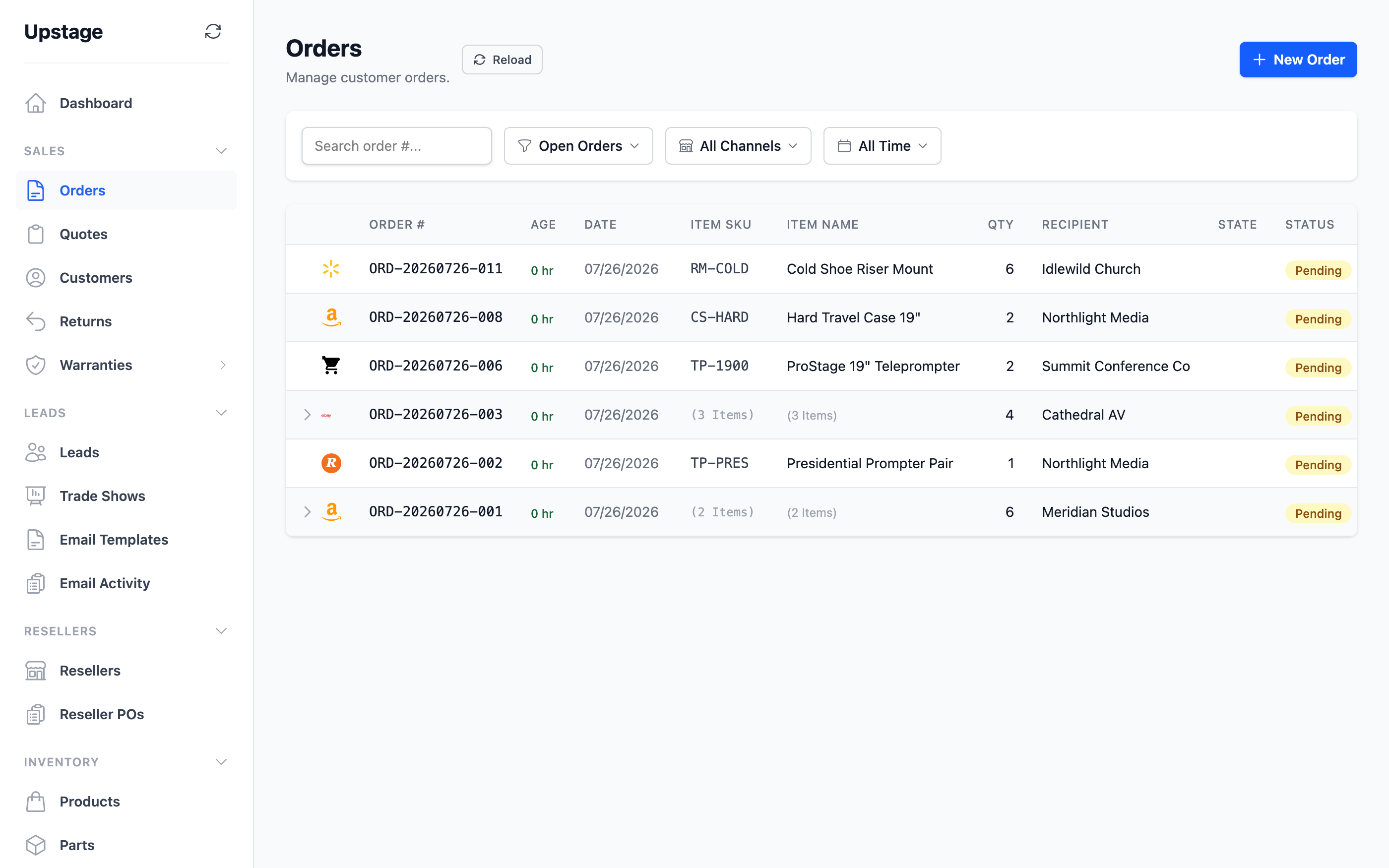
| One order list | Bring supported marketplace, storefront and direct orders into one view, with channel, date and status filters. |
| Manual orders & line items | Create direct orders and manage their products, quantities, pricing and delivery details. |
| Order lifecycle | Confirm, fulfill or cancel orders and keep their status visible to your team. |
| Customers & order history | Keep customer contact and address details alongside their orders and quotes. |
| Quotes from your catalog | Prepare itemized quotes using your products and pricing. |
| Quote links & PDFs | Share a customer-facing quote link or export a PDF. |
| Quote status & revisions | Track sent, accepted and declined quotes, and reopen or return a quote to draft when needed. |
| Quote-to-order conversion | Turn an accepted quote into an order while retaining its connection to the original quote. |
| Shipments & tracking | Record carriers, tracking numbers and shipment details against the order. |
| Order packaging | Calculate packaging requirements, adjust the supplies on an order and keep packaging inventory connected to fulfillment. |
| Unmatched sales items | Find imported order items that need a catalog match and link them individually or in bulk. |
| Channel SKU mappings | Map the item codes used by your sales channels to the matching MogDock products. |
| Order import rules | Configure rules that determine how imported orders are handled, and enable or disable them as your process changes. |
| Personal-order flag | Mark personal orders so they can be distinguished in your business workflows and bonus rules. |
Keep the contacts you meet at each show and the follow-up work in the same place.
| Feature | What you can do |
|---|---|
| Trade show records | Record each event’s name, date, location and notes. Archive past shows while keeping their leads. |
| Lead directory | Capture contact details, company, job title, addresses and notes for each lead. |
| Leads by event | Associate leads with a trade show and review that event’s lead and email activity. |
| CSV lead import | Import a lead list and associate it with an existing or new trade show. |
| Lead status & ratings | Mark leads new, contacted or archived and assign a rating to help prioritize follow-up. |
| Search & qualification filters | Find leads by event, status, rating, email activity or notes, and retain imported qualification details. |
| Reusable email templates | Prepare follow-up templates with personalized fields for each lead. |
| Compose & preview | Choose a template, review the message and set reply details before sending. |
| Bulk personalized follow-up | Select multiple leads and queue an individual follow-up message for each one. |
| Email delivery history | Review pending, sent and failed deliveries with the related lead and template. |
Sell services alongside physical products and keep track of what you owe the people who provide them.
| Feature | What you can do |
|---|---|
| Service products | Create service items with their own SKU and price, without treating them as physical inventory. |
| Service provider directory | Maintain provider names, contact details and active or inactive status. |
| Provider assignment | Associate each service product with the provider who earns its payout. |
| Flat or percentage rates | Set a flat payout per service unit or a percentage of the service line’s revenue. |
| Payout calculation | Calculate provider earnings for service items when their orders are fulfilled. |
| Monthly payout reports | Review earned, reversed and net amounts by provider and month, with the contributing order items. |
| Refund reversals | Keep reversal records for service payouts when an order is refunded. |
| Payment status tracking | Mark a provider’s monthly payouts as paid, individually or across the period, after you make payment. |
Calculate bonuses from fulfilled orders and give every payment a clear record.
| Feature | What you can do |
|---|---|
| Employee records | Keep employee names, contact details, employment type, dates and status together. |
| Per-product bonus rates | Assign each employee a per-unit bonus for the products they work on. |
| Bonus eligibility rules | Include or exclude orders using conditions such as channel, product, amount or the personal-order flag. |
| Automatic bonus calculation | Calculate eligible employee bonuses from the quantities in fulfilled orders. |
| Monthly & annual views | See employee bonus totals across the year and open a month to inspect the related orders and products. |
| Reversals & adjustments | Track earned and reversed bonuses, including adjustments tied to refunds and warranty claims. |
| Recalculate a period | Recalculate bonuses for fulfilled orders within a selected date range. |
| Mark bonuses paid | Record that an employee’s bonuses for a period have been paid after you make payment. |
| Bonus report exports | Export bonus reports as CSV or PDF for review and payment preparation. |
Give your business customers their own pricing and a connected ordering process.
| Feature | What you can do |
|---|---|
| Reseller accounts | Keep dealer company and contact records, with approval, suspension and reactivation controls. |
| Pricing tiers & discounts | Set reseller pricing and product discounts, copy pricing between accounts and apply changes in bulk. |
| Price sheets | Generate a reseller’s pricing sheet as a PDF and send it to the account. |
| Welcome packages | Prepare welcome letters and send onboarding materials to approved resellers. |
| Credit applications | Invite a reseller to complete an application, then review and approve or reject it. |
| Credit terms | Keep approved credit details and payment terms with the reseller account. |
| Reseller purchase orders | Record incoming dealer purchase orders, their items and their status. |
| Purchase document parsing | Upload a reseller purchase document to help prepare its order details for review. |
| Acceptance & conversion | Accept a reseller purchase order and convert it into a sales order. |
| Invoicing & payment status | Connect reseller purchase orders with invoices and record when they are paid. |
| Reseller settings | Configure the company’s reseller program and the materials used in its workflow. |
Keep after-sales work connected to the customer, product and original order.
| Feature | What you can do |
|---|---|
| Return requests | Create and approve returns, or cancel them when they are no longer needed. |
| Return shipments & receiving | Track items shipped back and record their arrival for inspection. |
| Item inspection & disposition | Record the condition of each returned item and decide what happens to it next. |
| Repairs & resolution | Track repair work, complete inspections and resolve the return. |
| Restocking & write-offs | Record returned quantities that go back into stock and items that must be written off. |
| Warranty registry | Keep product serial numbers, coverage dates and the related sale in a searchable registry. |
| Product warranty terms | Set manufacturer warranty coverage on products and configure company warranty conditions. |
| Extended warranty products | Offer warranty extension items alongside your products and retain their coverage details. |
| Warranty claims | Open and manage claims with their customer, original order, reason and affected items. |
| Replacement parts & tracking | Record parts sent for a claim, shipping details and the related stock movements. |
| Warranty return processing | Receive returned claim items and record their condition and disposition before closing the claim. |
| Claim costs | Keep parts, labor and shipping costs connected to the warranty claim. |
Follow the money from the sale to the payment and the costs of running the business.
| Feature | What you can do |
|---|---|
| Invoice creation | Create invoices from orders, quotes or reseller purchase orders, with itemized amounts and due dates. |
| Invoice lifecycle | Track draft, sent, paid and void invoices and keep the current balance visible. |
| Stripe invoicing | Prepare and send Stripe invoices for orders, and manage synced invoice drafts. |
| Accounts receivable | Review outstanding invoice balances and see which customer payments are due. |
| Payment records | Record order payments and review payment details in a central list. |
| Payment matching | Match imported payments to orders, review unmatched amounts and correct a match when needed. |
| Refunds | Process supported order refunds and keep the financial record connected to the sale. |
| Operating expenses | Record expense categories, amounts and notes alongside your sales finances. |
| Recurring expenses | Set expense frequency and effective dates so recurring business costs can be included in reporting. |
See your day-to-day activity and the numbers behind your margins.
| Feature | What you can do |
|---|---|
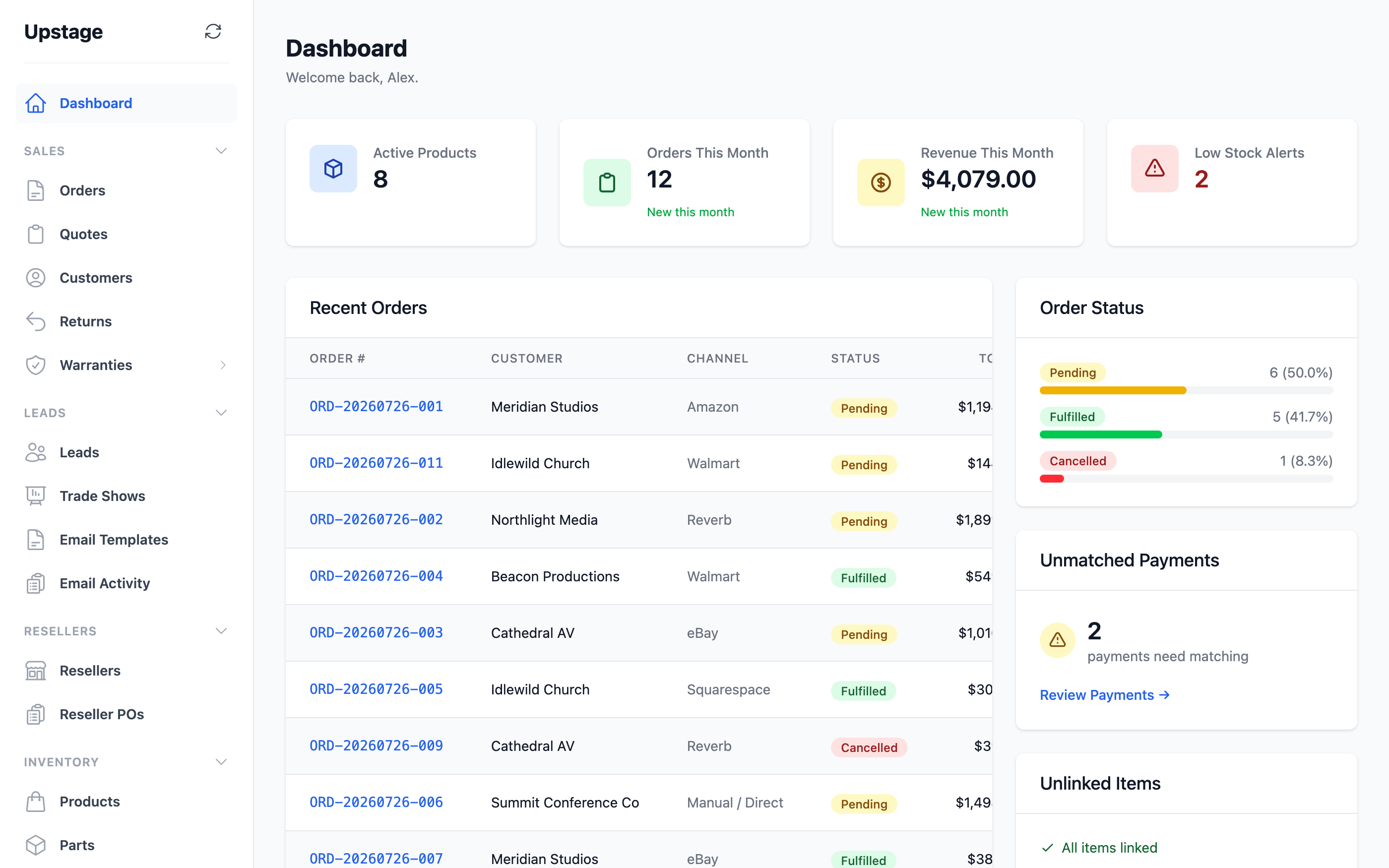
| Business dashboard | See orders, revenue, recent activity and low-stock indicators in one starting view. |
| Profit & loss | Review revenue and business costs for a selected reporting period. |
| Performance by channel | Compare the financial results of your sales channels. |
| Performance by product | Review revenue, costs and profitability by product. |
| Shipping analysis | Inspect shipping revenue and costs to understand their effect on order profitability. |
| Unit economics | Examine the revenue and cost breakdown behind individual products. |
| Report filters | Choose date ranges and channel filters to focus on the period and sales you need to review. |
| CSV report exports | Export financial and operating reports for further analysis or sharing. |
Connect supported accounts and see when a connection needs attention. Availability depends on provider approval and account setup.
| Feature | What you can do |
|---|---|
| Reverb | Marketplace orders |
| eBay | Marketplace orders |
| Amazon | Marketplace orders |
| Etsy | Marketplace orders |
| Walmart | Marketplace orders |
| Squarespace | Storefront orders |
| Stripe | Payments & invoices |
| ShipStation | Orders & shipment tracking |
| Connection management | Connect, reconnect or disconnect supported provider accounts from your workspace. |
| Scheduled & manual sync | Bring in supported provider data on scheduled runs or start a sync when you need it. |
| Sync status & history | Review connection state, recent sync runs and errors that need attention. |
| Stripe sync controls | Choose whether to sync payments, invoices and payment-link orders. |
| ShipStation sync controls | Choose whether to import orders and sync shipment tracking. |
Keep internal reference material alongside the work it supports.
| Feature | What you can do |
|---|---|
| Document folders | Group business documents into folders, with archive and reactivation controls. |
| Document sections | Organize the contents of a folder into sections. |
| File uploads & details | Upload files and maintain their document details. |
| Authenticated downloads | Access stored documents through your MogDock workspace. |
Set up the workspace around your business and give your team the access they need.
| Feature | What you can do |
|---|---|
| Team logins | Create individual user accounts, manage active status and help teammates reset their passwords. |
| Roles & permissions | Assign access permissions and create custom roles for different responsibilities. |
| Company settings | Maintain company information and the settings used across your business documents and workflows. |
| Business email setup | Connect Google Workspace or configure your SMTP service for outgoing business messages. |
| Company email templates | Customize the reusable messages sent from your business. |
| Audit history | Review recorded changes and activity in your workspace. |
| Personal preferences | Manage your profile, password and preferred application theme. |
| In-app support tickets | Open support requests, add replies and attachments, and close or reopen the conversation. |
| Support access approval | Approve or deny requests for support access to your organization. |
| Subscription management | Review your MogDock subscription and access its billing controls. |
Add AI access when you need it. MogDock MCP is a separate paid add-on, with an optional trial opt-in at signup.
| Feature | What you can do |
|---|---|
| Business lookups & actions | Use a compatible assistant to look up stock, find orders or help prepare business records such as quotes. |
| Scoped workspace access | Keep assistant access scoped to your organization and the permissions it is granted. |
| Revocable access | Manage access tokens and revoke connected assistant authorizations from your profile. |
| AI activity records | Keep an audit record of calls made through the MCP connection. |
All core modules above are included in MogDock. MogDock MCP is a separate paid add-on. Connector availability depends on provider approval and account setup.
The reason we built MogDock
A product is more than one item on a shelf. It’s every frame, bracket, screw and supply that goes into it. MogDock connects that list to your inventory.
Add the parts and quantities to your product’s bill of materials, or BOM.
MogDock uses the product quantity and its BOM to work out the parts used.
Each component’s stock goes down by the right amount. No separate adjustment for every part.
An example, part by part
Each kit uses 1 frame, 2 brackets and 8 screws.
| Part | Before | Used | Left |
|---|---|---|---|
| Frames | 10 | −3 | 7 |
| Brackets | 20 | −6 | 14 |
| Screws | 80 | −24 | 56 |
See it in MogDock
Current MogDock screens with fictional demo data. Captured September 2026 in light and dark themes.
Bills of materials
A bill of materials is the list of parts used in one product. Set the quantity of each component and see its cost, so the product and everything inside it have a shared starting point.
Try it for yourself
Parts inventory
See component stock, costs and low-stock alerts in one list. The same parts that appear in your product’s BOM are ready to count, label and replenish.
Try it for yourself
Products & inventory
On-hand stock and available stock are different numbers. MogDock keeps both visible, with a record behind each adjustment and low-stock thresholds for each item.
Try it for yourself
Inventory tools
A scan brings up the part, its current stock and a quantity field ready to update. Enter the count, save and move to the next label. Switch to reorder mode when it’s time to replenish.
Try it for yourself
Orders
Find the orders that need your attention without opening every marketplace. Keep the items, customer, payment and shipment together, from the first sale to delivery.
Try it for yourself
Dashboard
See your orders and revenue, compare recent activity, and check low-stock alerts. Your dashboard brings the next things to act on into view.
Try it for yourself
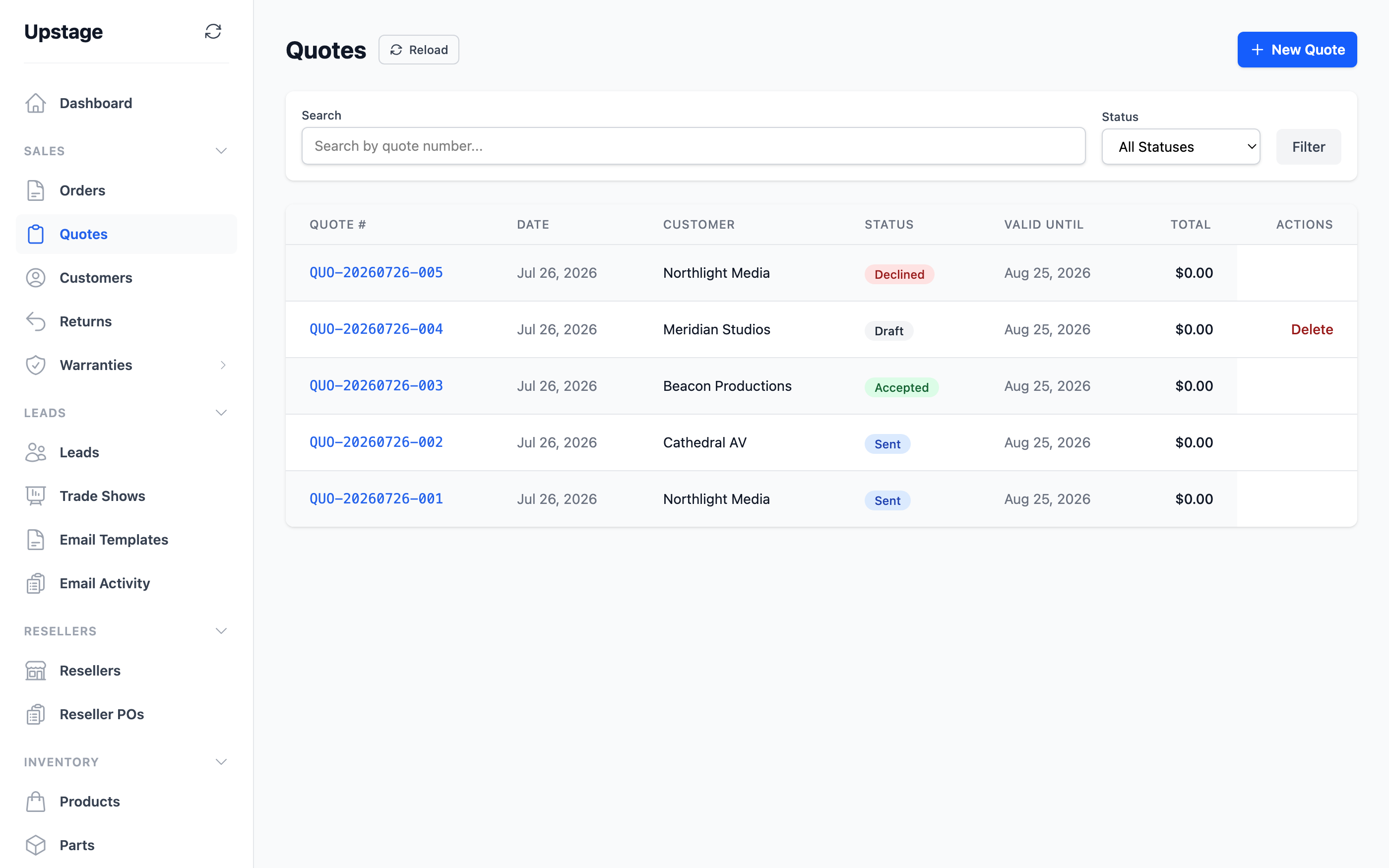
Quotes
Create a quote from your catalogue and share it by link or PDF. When the customer accepts, turn it into an order and keep the original quote attached.
Try it for yourself
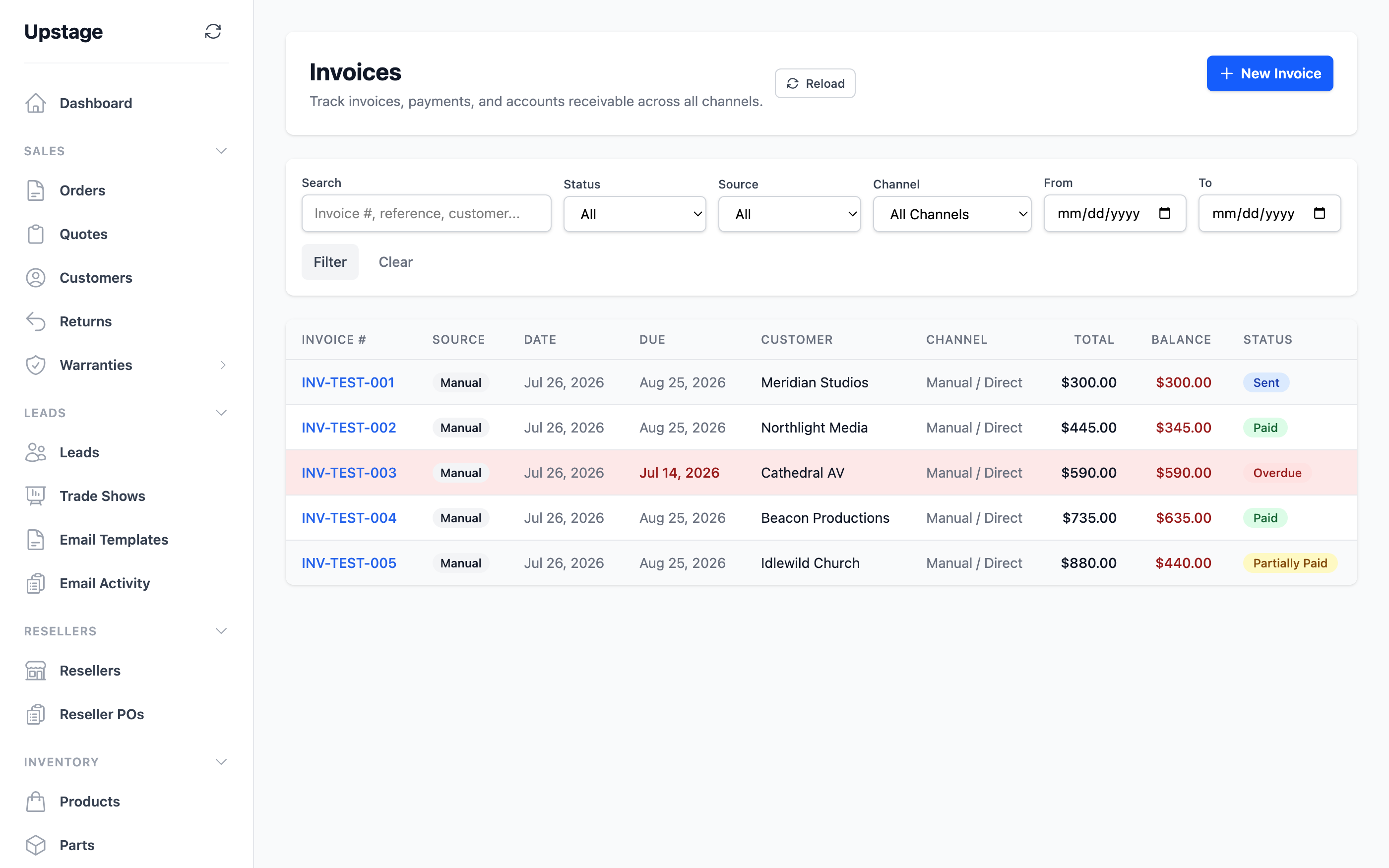
Invoices & payments
Create an invoice from an order, quote or reseller purchase order. Track its balance and due date, match payments, and review anything that hasn’t found the right order yet.
Try it for yourself
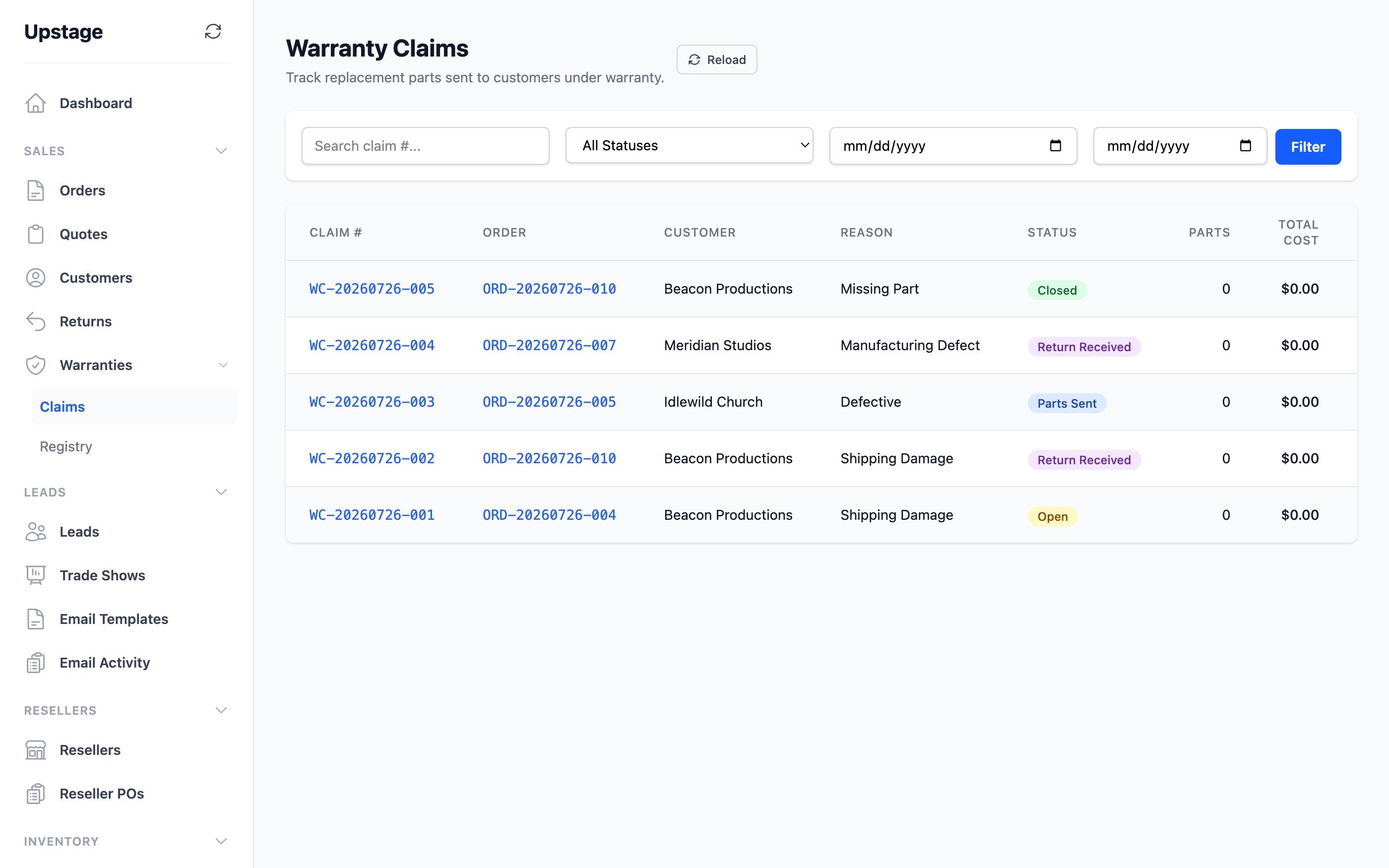
Returns & warranties
Follow a return or warranty claim from intake to resolution. Keep serial numbers, repair costs, parts and the original customer history together.
Try it for yourself
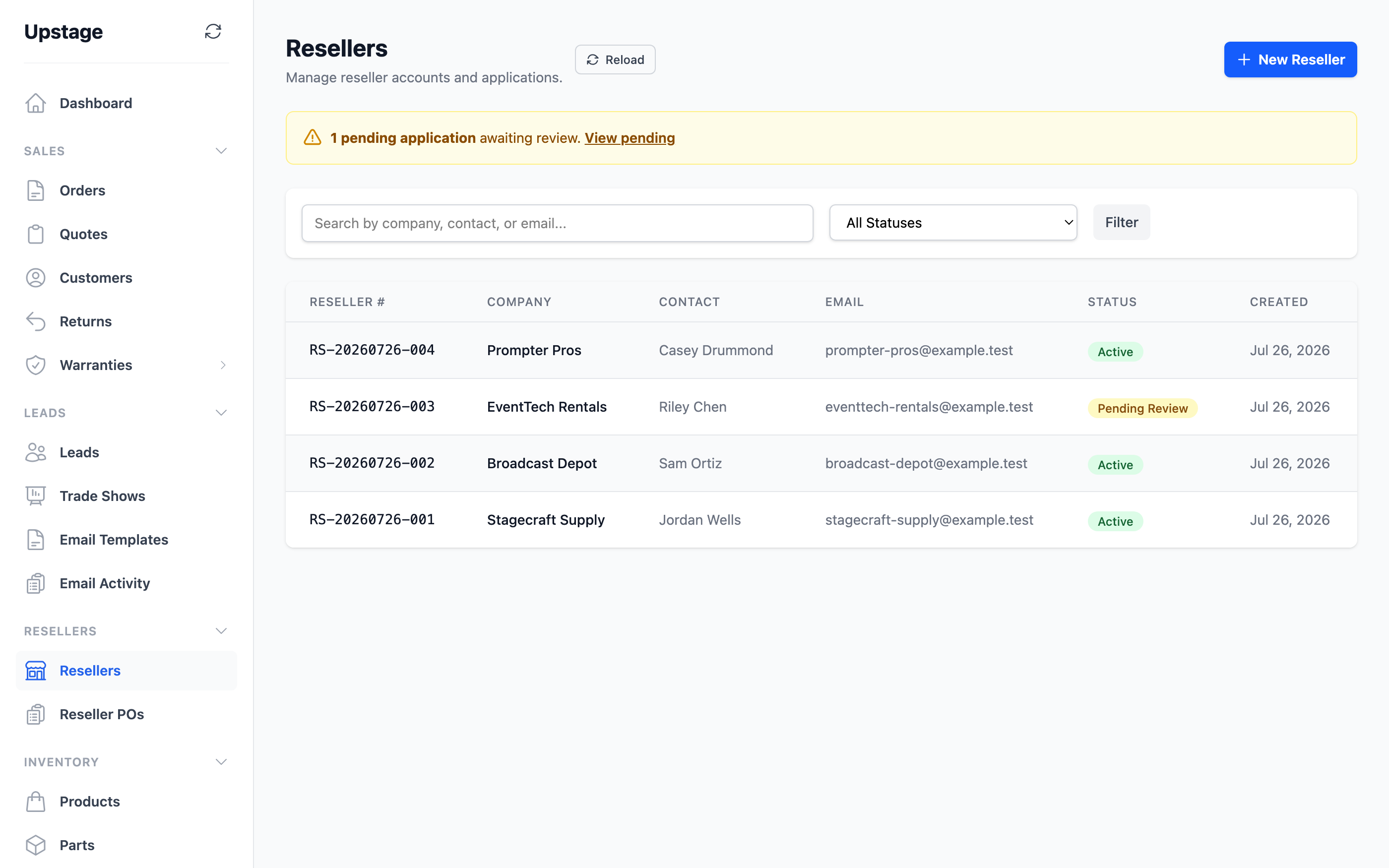
Wholesale & resellers
Give reseller accounts their own pricing tiers. Review credit applications and bring reseller purchase orders into the same order and invoice workflow.
Try it for yourself
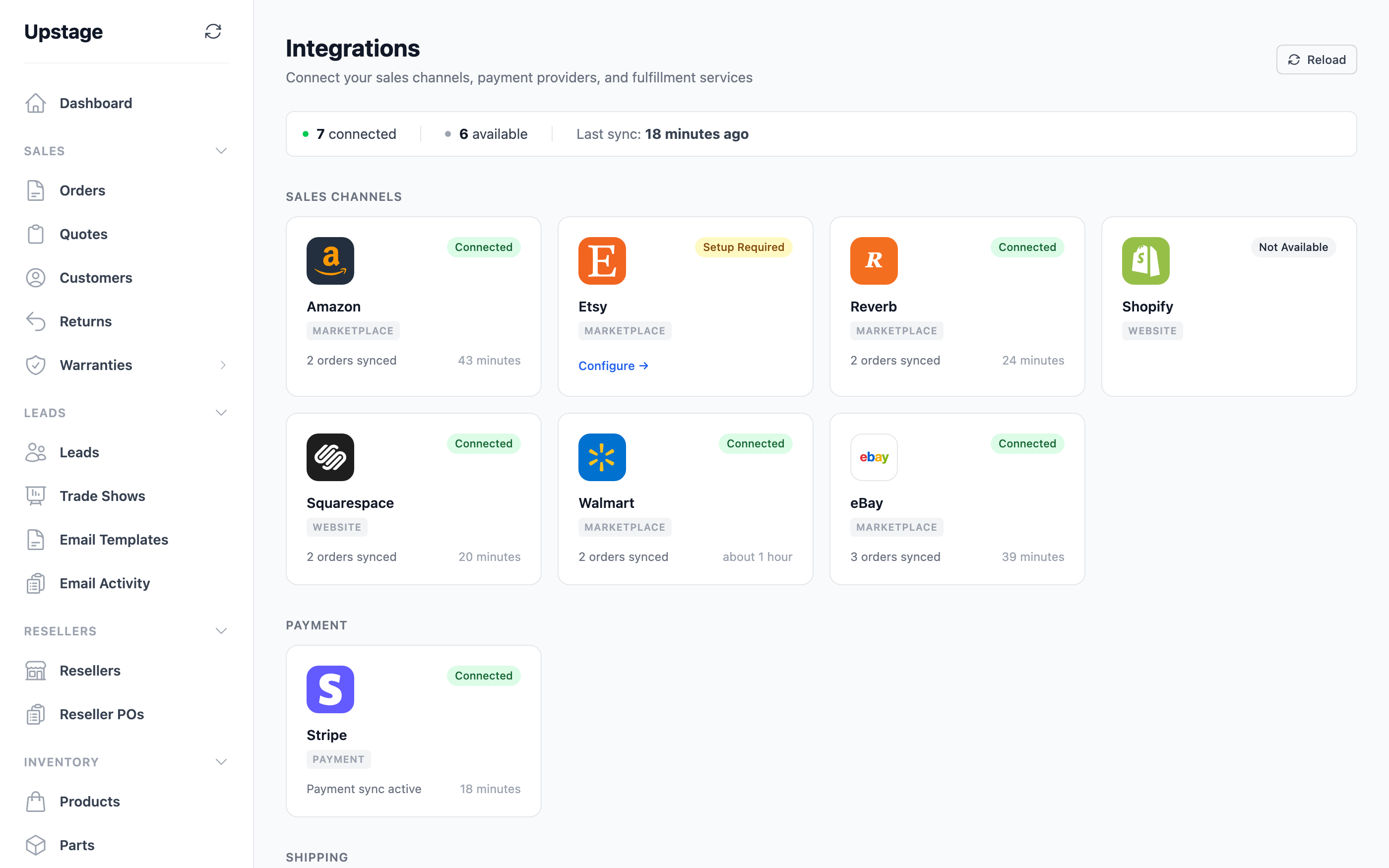
Sync & integrations
Check each channel’s connection state, last run and sync activity. Spot a connection that needs attention before it becomes a missing order.
Try it for yourself
The rest of the operation
Work with your vendors, create purchase orders, receive items into stock and resolve items that need a catalogue match.
Keep bills of materials, component costs and packaging requirements with the products they belong to.
See profit and loss, receivables and channel reports. Keep leads, trade shows and internal documents in the same workspace.
Your business, connected
Connectors are included in the subscription. Each provider’s approval process and account setup determine availability.
Have a channel in mind? Talk to us about your setup before you connect it.
Your workspace, your control
Each teammate gets their own login and access permissions. Support tickets live in the app, and you authorise any support access to your workspace.
How we look after your dataOptional add-on / MogDock MCP
MCP connects a compatible AI assistant to your MogDock workspace. Look up stock, find orders or draft a quote, with scoped access and an audit record of each call.
Manage. Operate. Grow.
Products, parts and the rest of your business, together. Get started with a free trial.